|
Accelerator Pedal or Lever Idle Validation Circuit – Data Erratic, Intermittent or Incorrect.
|

Overview
| CODE | REASON | EFFECT |
| Fault Code: 431 PID: S230 SPN: 558 FMI: 2/2 LAMP: Amber SRT: |
Accelerator Pedal or Lever Idle Validation Circuit – Data Erratic, Intermittent or Incorrect. Voltage detected simultaneously on both idle validation and off-idle validation switches. |
None. |
|
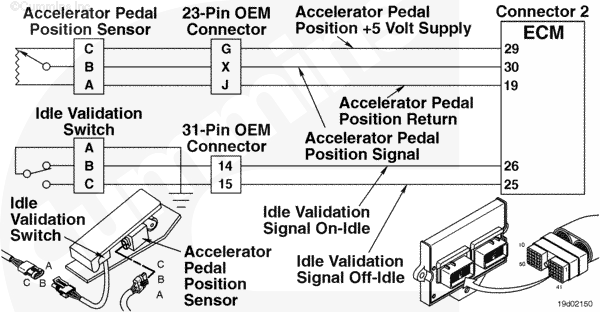
Accelerator Pedal or Lever Idle Validation Circuit |
 |
Circuit Description
The idle validation switch is used by the electronic control module (ECM) to indicate when the accelerator pedal or lever is released (on-idle or depressed (off-idle). The switch is adjusted during the pedal manufacturing process to switch from on-idle to off-idle at the correct accelerator pedal or lever position. The switch return is a shared return with other OEM cab switches.
Component Location
The integrated sensor switch is located on the accelerator pedal or lever assembly.
Shop Talk
- This fault code is usually caused by an open circuit on either the idle validation on-idle or off-idle signal circuits, a loose connection, uncalibrated accelerator pedal or lever assembly, or mis-wired idle validation switch.
- The integrated sensor switch has a different internal resistance specification (125 ohms) than the nonintegrated sensor switch.
- When installing a new accelerator pedal or lever assembly, it must be calibrated before operating the engine. To calibrate, turn the keyswitch to the ON position and fully depress and release the pedal three times.
Cautions and Warnings
 WARNING WARNING On automotive applications, set the service brake using the trailer brake hand valve. Make sure there is enough air pressure to activate the brake pressure switch. Securely chock the wheels. Truck movement during troubleshooting can cause severe equipment damage, personal injury or death.
|
 CAUTION CAUTION To reduce the possibility of damaging a new ECM, all other active fault codes must be investigated prior to replacing the ECM. |
|
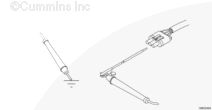
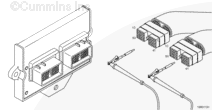
CAUTION To reduce the possibility of pin and harness damage, use the following test leads when taking a measurement: |
Troubleshooting Steps
| STEPS | SPECIFICATIONS | |
|---|---|---|
| STEP 1. | Check the integrated sensor switch. | |
| STEP 1A. Verify the integrated sensor switch is connected to the OEM harness. | Integrated sensor switch is connected to the OEM harness? | |
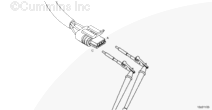
| STEP 1B. Inspect the integrated sensor switch connector pins. | Dirty or damaged pins? | |
| STEP 1C. Check the integrated sensor switch for an open circuit. | Less than 125 ohms? | |
| STEP 1D. Check the integrated sensor switch for a short circuit from pin to pin. | More than 100k ohms? | |
| STEP 2. | Check the wiring harnesses. | |
| STEP 2A. Check the wiring harnesses for an open circuit. | Greater than 4.0 VDC? | |
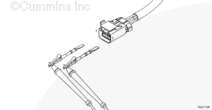
| STEP 2B. Inspect the engine harness and ECM connector pins. | Dirty or damaged pins? | |
| STEP 2C. Check the harnesses for an open circuit. | Less than 10 ohms? | |
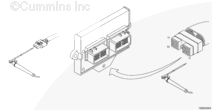
| STEP 2D. Check the OEM harness switch return circuit. | Less than 10 ohms? | |
| STEP 2E. Check for a pin to pin short circuit in the OEM harness. | Greater than 100k ohms? | |
| STEP 3. | Clear the fault codes. | |
| STEP 3A. Disable the fault code. | Fault Code 431 inactive? | |
| STEP 3B. Clear the inactive fault codes. | All fault codes cleared? | |
Guided Step 1 – Check the integrated sensor switch.
| Guided Step 1A – Verify the integrated sensor switch is connected to the OEM harness. | |
|---|---|
Conditions
Action
|
|
|
Integrated sensor switch is connected to the OEM harness? |
|
| YES | NO |
| No Repair |
Connect the integrated sensor switch to the OEM harness. Refer to the OEM service manual. |
| Guided Step 1B – Inspect the integrated sensor switch connector pins. | |
|---|---|
Conditions
Action
For general inspection techniques, refer to Component Connector and Pin Inspection, Procedure 019-361. |
|
|
Dirty or damaged pins? |
|
| YES | NO |
|
Repair the damaged pins. Repair or replace the harness, connector, whichever has the damaged pins.
|
No Repair |
| Guided Step 1C – Check the integrated sensor switch for an open circuit. | ||
|---|---|---|
Conditions
Action
Refer to the circuit diagram or wiring diagram for connector pin identification. For general resistance measurement techniques, refer to the Resistance Measurements Using a Multimeter and Wiring Diagram, Procedure 019-360. |
|
|
|
Less than 125 ohms? |
||
| YES | NO | |
| No Repair |
Refer to the OEM service manual. |
|
| Guided Step 1D – Check the integrated sensor switch for a short circuit from pin to pin. | ||
|---|---|---|
Conditions
Action
Refer to the circuit diagram or wiring diagram for connector pin identification. For general resistance measurement techniques, refer to the Resistance Measurements Using a Multimeter and Wiring Diagram, Procedure 019-360. |
|
|
|
More than 100k ohms? |
||
| YES | NO | |
| No Repair |
Refer to the OEM service manual. |
|
Guided Step 2 – Check the wiring harnesses.
| Guided Step 2A – Inspect the wiring harnesses for an open circuit. | ||
|---|---|---|
Conditions
Action
Refer to the circuit diagram or wiring diagram for connector pin identification. |
|
|
|
Greater than 4.0 VDC? |
||
| YES | NO | |
| No Repair | No Repair | |
| Guided Step 2B – Inspect the engine harness and ECM connector pins. | |
|---|---|
Conditions
Action
For general inspection techniques, refer to Component Connector and Pin Inspection, Procedure 019-361. |
|
|
Dirty or damaged pins? |
|
| YES | NO |
|
A defective connection has been detected in the ECM or engine harness connector. Repair the damaged pins. Repair or replace the harness, connector, whichever has the damaged pins.
|
No Repair |
| Guided Step 2C – Check the harnesses for an open circuit. | ||
|---|---|---|
Conditions
Action
Refer to the circuit diagram or wiring diagram for connector pin identification. For general resistance measurement techniques, refer to the Resistance Measurements Using a Multimeter and Wiring Diagram, Procedure 019-360. |
|
|
|
Less than 10 ohms? |
||
| YES | NO | |
| No Repair |
Repair or replace the OEM harness.
|
|
| Guided Step 2D – Check the OEM harness switch return circuit. | ||
|---|---|---|
Conditions
Action
Refer to the circuit diagram or wiring diagram for connector pin identification. For general resistance measurement techniques, refer to the Resistance Measurements Using a Multimeter and Wiring Diagram, Procedure 019-360. |
|
|
|
Less than 10 ohms? |
||
| YES | NO | |
| No Repair |
Repair or replace the OEM harness.
|
|
| Guided Step 2E – Check for a pin to pin short circuit in the OEM harness. | ||
|---|---|---|
Conditions
Action
Refer to the circuit diagram or wiring diagram for connector pin identification. For general resistance measurement techniques, refer to the Resistance Measurements Using a Multimeter and Wiring Diagram, Procedure 019-360. |
|
|
|
Greater than 100k ohms? |
||
| YES | NO | |
| No Repair |
Repair or replace the OEM harness.
|
|
Guided Step 3 – Clear the fault codes.
| Guided Step 3A – Disable the fault code. | |
|---|---|
Conditions
Action
|
|
|
Fault Code 431 inactive? |
|
| YES | NO |
| No Repair | No Repair |
| Guided Step 4B – Clear the inactive fault codes. | |
|---|---|
Conditions
Action
|
|
|
All fault codes cleared? |
|
| YES | NO |
| No Repair | No Repair |
|
Repair complete
|
Appropriate troubleshooting steps
|

;)
;)
;)
;)
;)
;)
;)
;)
;)
;)
;)
;)