The following procedure is without removing the rear cover plate:
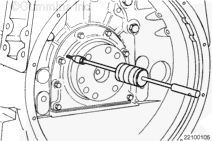
Drill one or more holes into the rear crankshaft oil seal flange. Use the screw tip attachment to install a slide hammer (similar to Snap-On™, Part Number CJ114) into the drilled hole(s).
Remove the seal.
Use a magnet to remove any metal shavings from the seal bore or the crankshaft.
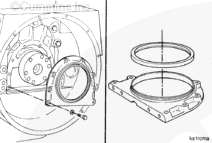
The following procedure is with removing the rear cover plate:
CAUTION
Use extreme care when releasing the oil pan gasket from the rear cover to prevent damage to the gasket. If the gasket is damaged, the oil pan must be removed and the gasket replaced. Refer to Procedure 007-025 in Section 7.
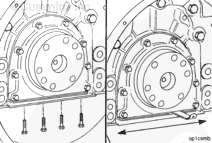
Remove the four oil pan mounting capscrews that secure the oil pan to the rear cover.
Insert a feeler gauge or a shim stock between the rear cover and the oil pan gasket. Move the feeler gauge or the shim stock back and forth to release the gasket from the rear cover.
Hello, I'm Jack, a diesel engine fan and a blogger. I write about how to fix and improve diesel engines, from cars to trucks to generators. I also review the newest models and innovations in the diesel market. If you are interested in learning more about diesel engines, check out my blog and leave your feedback.
View all posts by Jack

 CAUTION


;)
;)
;)
;)
;)
;)
