B5.9G, B5.9LPG – Troubleshooting and Repair Manual – 013-007   Batteries

Table of Contents

Initial Check

Initial Check

TOC

 WARNING 

Acid is extremely dangerous and can damage the machinery and can also cause serious burns. Always provide a tank of strong soda water as a neutralizing agent when servicing batteries. Wear goggles and protective clothing to avoid serious bodily injury.
 WARNING 

Batteries can emit explosive gases. To avoid injury, always ventilate the compartment before servicing the batteries. To avoid arcing, remove the negative (-) battery cable first and attach the negative (-) battery cable last.

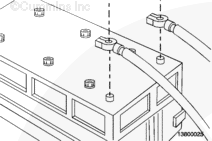
Label and disconnect all battery cables.

SMALL | MEDIUM | LARGE


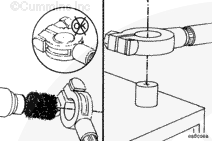
Clean corrosion and debris from battery and terminals.

SMALL | MEDIUM | LARGE


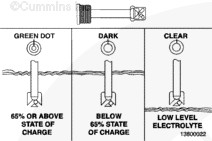
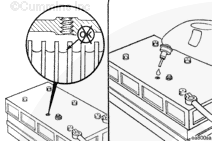
Check the “Eye” on the maintenance-free battery. Refer to the OEM specifications.

SMALL | MEDIUM | LARGE


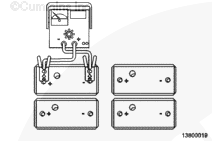
Remove the surface charge by attaching the battery to a 300-amp load for 30 seconds for heavy-duty batteries.

SMALL | MEDIUM | LARGE


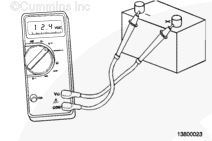
Remove the load, and wait 1 minute; if the battery voltage is greater than or equal to 12.4 VDC, continue testing. If the voltage is below 12.4 VDC, recharge or replace the battery.

SMALL | MEDIUM | LARGE


Load-test the batteries at 1/2 of the cold cranking amp rating of the battery (rating at -18°C [0°F] for 15 seconds).

SMALL | MEDIUM | LARGE


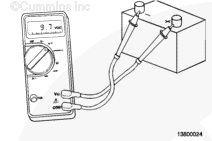
Check the battery voltage, and compare to the table:

Temperature and Voltage Relationship 
Temp (F) 70 60 50 40 30 20 10 0
Temp (C) 21 16 10 4 -1 -7 -12 -18
Min. VDC 9.6 9.5 9.4 9.3 9.1 8.9 8.7 8.5

Turn the load off.

Replace the battery if it does not meet the above specifications.

SMALL | MEDIUM | LARGE


NOTEAlways connect the negative (-) battery cables last.

Connect all battery cables.

SMALL | MEDIUM | LARGE


If conventional batteries are used, remove the cell caps or covers, and check the electrolyte level.

NOTE: Maintenance-free batteries are sealed and do not require the addition of water.

Fill each battery cell with distilled water. Refer to the battery manufacturer’s specifications.

NOTE: If water is added to the battery it must be charged before any testing can be accomplished.

SMALL | MEDIUM | LARGE


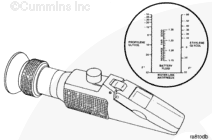
Refractometer, Part No. CC-2800

Use the Fleetguard® Refractometer, Part No. CC-2800, to check the specific gravity of the battery electrolyte.

Refer to the battery fluid column in the refractometer to determine the state of charge of each battery cell.

If water has been added to a dry cell, recharge the battery to mix the added water with the existing battery electrolyte to prevent incorrect readings.

SMALL | MEDIUM | LARGE


 CAUTION 

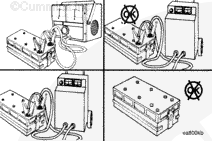
Do not connect battery charging cables to any electronic control system part. This can damage the electronic control system parts.

Systems Analyzer/Battery Tester, Part No. 3377193

Use the systems analyzer/battery tester, Part No. 3377193, to test the output amperage of maintenance-free or conventional vent-cap batteries.

If the output amperage is low, use a battery charger to charge the battery. Refer to the manufacturer’s instructions.

Replace the battery if it will not charge to the manufacturer’s specifications or will not maintain a charge.

Refer to the accompanying table to determine the battery state of charge based on the specific-gravity readings.

Battery State of Charge Specific Gravity @ 27°C [80°F]
100% 1.260 to 1.280
75% 1.230 to 1.250
50% 1.200 to 1.220
25% 1.170 to 1.190
Discharged 1.110 to 1.130

SMALL | MEDIUM | LARGE


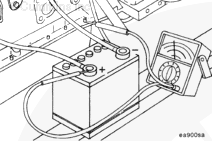
All batteries, including maintenance-free ones, can be checked by measuring the voltage between the positive (+) battery cable and the engine block ground (-). Note the voltage.

SMALL | MEDIUM | LARGE


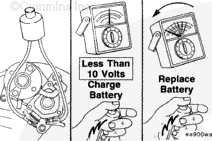
Using a remote start connection, attempt to engage the starter while observing the voltage.

If the voltage reads less than 10 VDC, charge the battery.

If the voltage drops rapidly more than 2 VDC, replace the battery.

SMALL | MEDIUM | LARGE
Last Modified:  03-Apr-2002