|
High Engine Oil Pressure – Over Pressure
|

Overview
High Engine Oil Pressure – Over Pressure
| CODE | REASON | EFFECT |
| Fault Code: 142 PID: P100 SPN: 100 FMI: 16 LAMP: Amber SRT: |
Engine Oil Pressure High — Warning. Pressure is above the engine protection limit. |
None on performance. |
|
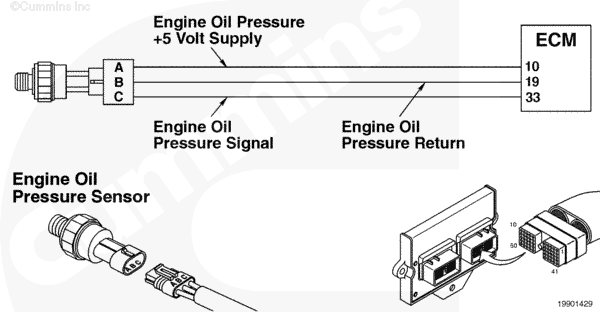
Engine Oil Pressure Sensor Circuit |
 |
Circuit Description
The oil pressure sensor is used by the electronic control module (ECM) to monitor the lubricating oil pressure. The ECM monitors the voltage on the signal pin and converts this to a pressure value. The oil pressure value is used by the ECM for the engine protection system.
Component Location
The oil pressure sensor is located in the engine block, on the fuel system side.
Shop Talk
Does the fault occur only in cold weather? If so, allow the oil to warm up and see if the fault goes inactive.
The L Gas Plus uses only a pressure sensor.
Troubleshooting Steps
| STEPS | SPECIFICATIONS | |
|---|---|---|
| STEP 1. | Check the fault codes. | |
| STEP 1. Read the fault codes. | Fault Code 142 active? | |
| STEP 2. | Check the oil pressure sensor accuracy. | |
| STEP 2A. Check the sensor accuracy. | Sensor reading is correct? | |
| STEP 3. | Clear the fault codes. | |
| STEP 3A. Disable the fault code. | Fault Code 142 inactive? | |
| STEP 3B. Clear the inactive fault codes. | All fault codes cleared? | |
Guided Step 1 – Check the fault codes.
| Guided Step 1A – Read the fault codes. | |
|---|---|
Conditions
ActionUse INSITE™ electronic service tool to read the fault codes. |
|
|
Fault Code 142 active? |
|
| YES | NO |
| No Repair | No Repair |
Guided Step 2 – Check the oil pressure sensor accuracy.
| Guided Step 2A – Check the sensor accuracy. | |
|---|---|
Conditions
Action
Note: If necessary, increase the engine rpm’s to make it easier to see differences in the readings. |
|
|
Sensor reading is correct? |
|
| YES | NO |
| No Repair |
Replace the sensor if electronic service tool reading differs from mechanical gauge reading. Refer to Procedure 019-155. |
Guided Step 3 – Clear the fault codes.
| Guided Step 3A – Disable the fault code. | |
|---|---|
Conditions
Action
Note: If the fault was at a particular speed, run the engine at that speed to verify the problem is corrected. |
|
|
Fault Code 142 inactive? |
|
| YES | NO |
| No Repair |
Repeat the troubleshooting steps. If the fault code remains active, refer to the Lubricating Oil Temperature Above Specifications troubleshooting symptom chart in Section TS of the Troubleshooting and Repair Manual C Gas, C Gas Plus, and L Gas Plus Engines, Bulletin 3666206. |
| Guided Step 3B – Clear the inactive fault codes. | |
|---|---|
Conditions
Action
|
|
|
All fault codes cleared? |
|
| YES | NO |
| No Repair |
Troubleshoot any remaining active fault codes. |
|
Repair complete
|
Appropriate troubleshooting charts
|

;)
;)