|
Engine Oil Pressure Low – Warning
|

Overview
Engine Oil Pressure Low – Warning
| CODE | REASON | EFFECT |
| Fault Code: 143 PID: P100 SPN: 100 FMI: 1/18 LAMP: Yellow SRT: |
Engine Oil Pressure Low – Warning. Engine oil pressure signal indicates engine oil pressure below the engine protection warning limit. |
Progressive power derate increasing in severity from time of alert. If engine protection shutdown is enabled, the engine will shutdown after 30 seconds of the red lamp flashing. |
|
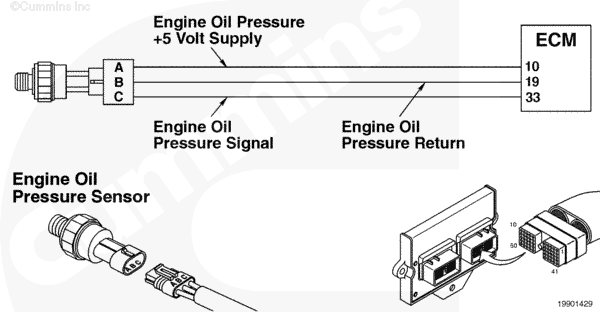
Engine Oil Pressure Sensor Circuit |
 |
Circuit Description
The oil pressure sensor is used by the electronic control module (ECM) to monitor the lubricating oil pressure. The ECM monitors the voltage on the signal pin and converts this to a pressure value. The oil pressure value is used by the ECM for the engine protection system.
Component Location
The oil pressure sensor is located on the engine block, on the fuel system side.
Shop Talk
Verify with the driver the engine speed at which the fault occurs. If the engine is being operated at too low of a speed, the oil pressure can drop below the engine protection limits.
Possible causes:
- Low oil level
- Low operation speeds
- Oil dilution
- Oil filter needs to be changed.
The L Gas Plus uses only a pressure sensor.
Troubleshooting Steps
| STEPS | SPECIFICATIONS | |
|---|---|---|
| STEP 1. | Check the engine oil pressure sensor accuracy. | |
| STEP 1A. Check the sensor accuracy. | Sensor reading is correct? | |
| STEP 2. | Check engine oil pressure. | |
| STEP 2A. Check engine oil pressure with a mechanical gauge. | Is oil pressure greater than 48 kPa [7 psi]? | |
| STEP 3. | Clear the fault codes. | |
| STEP 3A. Disable the fault code. | Fault Code 143 inactive? | |
| STEP 3B. Clear the inactive fault codes. | All fault codes cleared? | |
Guided Step 1 – Check the engine oil pressure sensor accuracy.
| Guided Step 1A – Check the sensor accuracy. | |
|---|---|
Conditions
Action
|
|
|
Sensor reading is correct? |
|
| YES | NO |
| No Repair |
Replace the sensor if electronic service tool reading differs from mechanical gauge reading. Refer to Procedure 019-066. |
Guided Step 2 – Check engine oil pressure.
| Guided Step 2A – Check the engine oil pressure with a mechanical gauge. | |
|---|---|
Conditions
Action
|
|
|
Is oil pressure greater than 48 kPa [7 psi]? |
|
| YES | NO |
| No Repair | No Repair |
|
Refer to the Lubricating Oil Pressure Low troubleshooting symptom tree.
|
|
Guided Step 3 – Clear the fault codes.
| Guided Step 3A – Disable the fault code. | |
|---|---|
Conditions
Action
Note: If the fault was at a particular speed, run the engine at that speed to verify the problem is corrected. |
|
|
Fault Code 143 inactive? |
|
| YES | NO |
| No Repair |
Repeat the troubleshooting steps. If fault code remains active, go to the Low Oil Pressure symptom tree in Section TS. |
| Guided Step 3B – Clear the inactive fault codes. | |
|---|---|
Conditions
Action
|
|
|
All fault codes cleared? |
|
| YES | NO |
| No Repair |
Troubleshoot any remaining active fault codes. |
|
Repair complete.
|
Appropriate troubleshooting charts
|

;)
;)