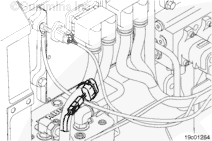
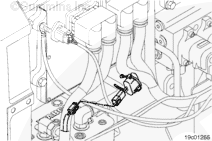
The real-time clock battery is connected to the engine harness main branch directly under the 50-pin engine electronic control module (ECM) connector.
The ECM uses the real-time clock feature to time-stamp faults and other data with the time and date. The battery is used to power the real-time clock circuitry in the ECM when vehicle battery power is removed from the ECM. If a battery is installed, the ECM clock will maintain the correct time and date with power removed from the ECM, provided the engine harness connector remains plugged into the ECM.
If a real-time clock battery is not installed on the engine, it will be necessary to set the time and date using INSITE™ electronic service tool whenever the Real-Time Clock feature is enabled in the ECM, and the vehicle battery power is removed from the ECM.
Batteries can emit explosive gases. To reduce the possibility of personal injury, always ventilate the compartment before servicing the batteries. To reduce the possibility of arcing, remove the negative (-) battery cable first and attach the negative (-) battery cable last.
Locate the real-time clock battery on the main engine harness. Cut the wire tie securing the module case to the harness.
Clean the area around the battery harness connector.
Hello, I'm Jack, a diesel engine fan and a blogger. I write about how to fix and improve diesel engines, from cars to trucks to generators. I also review the newest models and innovations in the diesel market. If you are interested in learning more about diesel engines, check out my blog and leave your feedback.
View all posts by Jack

 WARNING



;)
;)
;)
;)
