|
Fuel Pressure Sensor Circuit – Low Pressure, Secondary
|

Overview
| CODE | REASON | EFFECT |
| Fault Code: 482 PID: P94 SPN: 94 FMI: 1/18 LAMP: Amber SRT: |
Secondary Fuel Pressure Low – Warning. Pressure below the engine protection limit. |
Engine power derate. |
|
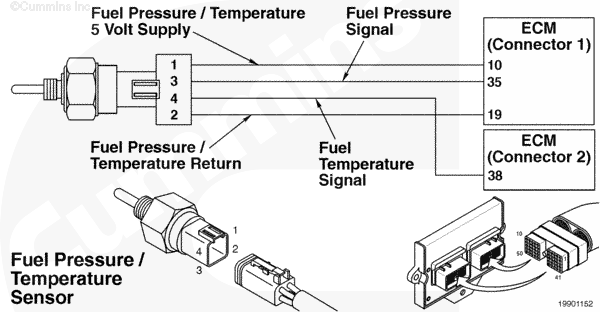
Fuel Pressure/Temperature Sensor Circuit |
 |
Circuit Description
The ECM uses the fuel pressure/temperature sensor (combination sensor) to measure the secondary fuel pressure, as well as the temperature.
Component Location
The fuel pressure/temperature sensor is located in the fuel housing.
Shop Talk
The secondary fuel pressure sensor detects fuel pressure after the fuel shutoff valve.
Troubleshooting Steps
| STEPS | SPECIFICATIONS | |
|---|---|---|
| STEP 1. | Check the fault codes. | |
| STEP 1A. Check for multiple fault codes. | Fault Codes 118, 119, 2118, 2119, and/or 2228 inactive? | |
| STEP 2. | Check the fuel pressure. | |
| STEP 2A. Manually check the fuel pressure after the high-pressure regulator. | Is pressure correct for the platform? | |
| STEP 3. | Check the secondary fuel pressure sensor. | |
| STEP 3A. Inspect the secondary fuel pressure sensor and engine harness connector pins. | Dirty or damaged pins? | |
| STEP 3B. Verify the fuel pressure sensor reading. | Fuel pressure within five percent? | |
| STEP 4. | Clear the fault codes. | |
| STEP 3A. Disable the fault code. | Fault Code 482 inactive? | |
| STEP 3B. Clear the inactive fault codes. | All fault codes cleared? | |
Guided Step 1 – Check the fault codes.
| Guided Step 1A – Check for multiple fault codes. | |
|---|---|
Conditions
ActionRead the fault codes.
|
|
|
Fault Codes 118, 119, 2118, 2119, and/or 2228 active? |
|
| YES | NO |
| No Repair | No Repair |
|
Appropriate troubleshooting tree
|
|
Guided Step 2 – Check the fuel pressure.
| Guided Step 2A – Manually check the fuel pressure after the high-pressure regulator. | |
|---|---|
Conditions
ActionManually check the fuel pressure before the low-pressure regulator; compare with INSITE™ electronic service tool reading.
Note: All pressure sensors on the Plus engines are absolute sensors. The minimum values are:
|
|
|
Is pressure correct for the platform? |
|
| YES | NO |
| No Repair |
Check the fuel level. Replace the high-pressure regulator. Refer to the OEM service manual. |
Guided Step 3 – Check the secondary fuel pressure sensor.
| Guided Step 3A – Inspect the secondary fuel pressure sensor and engine harness connector pins. | |
|---|---|
Conditions
ActionInspect the sensor and engine harness connector pins for the following:
|
|
|
Dirty or damaged pins? |
|
| YES | NO |
|
Repair the damaged pins. Repair or replace the harness, or replace the sensor, whichever has the damaged pins.
|
No Repair |
| Guided Step 3B – Verify the fuel pressure sensor reading. | |
|---|---|
Conditions
ActionVerify the fuel pressure.
|
|
|
Fuel pressure within five percent? |
|
| YES | NO |
| No Repair |
Replace the fuel pressure sensor. |
Guided Step 4 – Clear the fault codes.
| Guided Step 4A – Disable the fault code. | |
|---|---|
Conditions
ActionDisable the fault code.
|
|
|
Fault Code 482 inactive? |
|
| YES | NO |
| No Repair |
Troubleshooting procedures need to be repeated from the beginning. |
| Guided Step 4B – Clear the inactive fault codes. | |
|---|---|
Conditions
ActionClear the inactive fault codes.
|
|
|
All fault codes cleared? |
|
| YES | NO |
| No Repair |
Troubleshoot and remaining active fault codes. |
|
Repair complete
|
Appropriate troubleshooting charts
|

;)
;)