Preparatory Steps
TOC
Industrial and Power Generation
Remove
TOC
Industrial and Power Generation
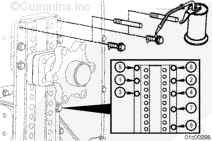
Remove two capscrews and install two guide studs.
Remove the remaining six capscrews.
Install
TOC
Industrial and Power Generation
Use clean 15W40 oil to lubricate the capscrew threads.
Install six capscrews.
Remove the two guide studs and install the remaining two capscrews.
Tighten the eight capscrews in the sequence shown.
Torque Value: 56 n.m [41 ft-lb]
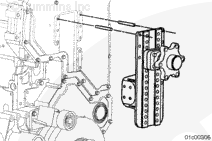
Install the belt tensioner support bracket to the engine and fan support.
Tighten all eight capscrews finger tight.
Tighten capscrew numbers 1 and 2 finger tight to mate the surfaces of the belt tensioner support bracket to the fan support.
Tighten capscrew numbers 3, 4, 5, and 6.
Torque Value: 90 n.m [66 ft-lb]
Tighten capscrew numbers 1, 2, 7, and 8.
Torque Value: 56 n.m [41 ft-lb]
Finishing Steps
TOC
Industrial and Power Generation
Last Modified: 18-Apr-2005
Published by Jack
Hello, I'm Jack, a diesel engine fan and a blogger. I write about how to fix and improve diesel engines, from cars to trucks to generators. I also review the newest models and innovations in the diesel market. If you are interested in learning more about diesel engines, check out my blog and leave your feedback.
View all posts by Jack




;)
;)
;)
;)
;)
;)
;)
;)
;)
;)
