|
Remote Accelerator Pedal Position Sensor Circuit – Shorted High
|

Overview
Remote Accelerator Pedal Position Sensor Circuit – Shorted High
| CODE | REASON | EFFECT |
| Fault Code: 133 PID: P029 SPN: 974 FMI: 3 LAMP: Red SRT: |
Remote Accelerator Pedal Position Sensor Circuit – Shorted High. High voltage detected on the sensor signal pin at the ECM. |
Engine will only idle if the remote accelerator is enabled. |
|
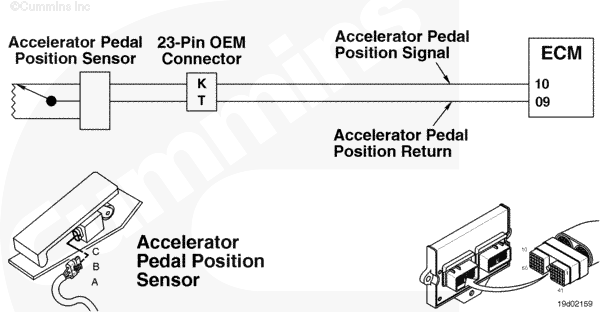
Remote Accelerator Pedal Position Sensor Circuit |
 |
Circuit Description
The electronic control module (ECM) uses the remote accelerator pedal position input to determine the remote accelerator pedal position.
Component Location
The remote accelerator pedal position sensor is located on the remote accelerator pedal.
Shop Talk
The remote accelerator pedal position sensor functions similarly to the accelerator pedal position sensor.
- Make sure there are no external circuits hooked into the remote accelerator pedal position sensor circuit and that there are no signs of tampering in the circuit.
- If all the wiring and sensor checks are okay, replace the remote accelerator pedal position sensor and the idle validation switch circuit wires, between the accelerator pedal and ECM, with new wires. Run the wires through or around the bulkhead without using the bulkhead connector. Test the vehicle with the test wires in place. If the fault code goes away, replace the OEM harness.
- Verify that the remote accelerator pedal position sensor wires are twisted together.
Cautions and Warnings
 CAUTION CAUTION To reduce the possibility of damaging a new ECM, all other active fault codes must be investigated prior to replacing the ECM. |
|
CAUTION To reduce the possibility of pin and harness damage, use the appropriate test lead when taking a measurement. |
|
CAUTION To reduce the possibility of pin and harness damage, use the following test leads when taking a measurement: |
Troubleshooting Steps
| STEPS | SPECIFICATIONS | |
|---|---|---|
| STEP 1. | Check the fault codes. | |
| STEP 1A. Check for sensor supply or multiple fault codes. | Fault Code 227 active? | |
| STEP 1B. Check for an inactive fault code. | Fault Code 133 inactive? | |
| STEP 2. | Check the remote accelerator pedal/lever and circuit. | |
| STEP 2A. Inspect the remote accelerator pedal/lever and connector pins. | Dirty or damaged pins? | |
| STEP 2B. Check the remote accelerator pedal/lever supply voltage and return circuit. | 4.5 to 5.25 VDC? | |
| STEP 2C. Check the circuit response. | Fault Code 134 active and Fault Code 133 inactive? | |
| STEP 2D. Check the fault codes and verify remote accelerator pedal/lever condition. | Fault Code 133 active? | |
| STEP 3. | Check the ECM and engine harness. | |
| STEP 3A. Inspect the ECM and engine harness connector pins. | Dirty or damaged pins? | |
| STEP 3A-1. Check for an open circuit in the engine harness and OEM harness. | ||
| STEP 3A-2. Check for a pin to pin short circuit in the engine harness and OEM harness. | ||
| STEP 3B. Check for an inactive fault code. | Fault Code 133 inactive? | |
| STEP 4. | Clear the fault codes. | |
| STEP 4A. Disable the fault code. | Fault Code 133 inactive? | |
| STEP 4B. Clear the inactive fault codes. | All fault codes cleared? | |
Guided Step 1 – Check the fault codes.
| Guided Step 1A – Check for sensor supply or multiple fault codes. | |
|---|---|
Conditions
Action
|
|
|
Fault Code 227 active? |
|
| YES | NO |
| No Repair | No Repair |
|
Fault Code 227
|
|
| Guided Step 1B – Check for inactive fault codes. | |
|---|---|
Conditions
Action
|
|
|
Fault Code 133 inactive? |
|
| YES | NO |
| No Repair | No Repair |
Guided Step 2 – Check the remote accelerator pedal/lever and circuit.
| Guided Step 2A – Inspect the remote accelerator pedal/lever and connector pins. | |
|---|---|
Conditions
Action
For general inspection techniques, refer to Component Connector and Pin Inspection, Procedure 019-361. |
|
|
Dirty or damaged pins? |
|
| YES | NO |
|
A defective connection has been detected in the sensor or harness connector.
|
No Repair |
| Guided Step 2B – Check the remote accelerator pedal/lever supply voltage and return circuit. | |
|---|---|
Conditions
Action
Refer to the circuit diagram or wiring diagram for connector pin identification. |
|
|
4.5 to 5.25 VDC? |
|
| YES | NO |
| No Repair | No Repair |
| Guided Step 2C – Check the circuit response. | |
|---|---|
Conditions
Action
|
|
|
Fault Code 134 active and Fault Code 133 inactive? |
|
| YES | NO |
| No Repair | No Repair |
| Guided Step 2D – Check the fault codes and verify remote accelerator pedal/lever condition. | |
|---|---|
Conditions
Action
|
|
|
Fault Code 133 active? |
|
| YES | NO |
|
A defective remote accelerator pedal/lever has been detected. Contact the appropriate OEM or dealership for repair instructions.
|
No Repair |
Guided Step 3 – Check the ECM and engine harness.
| Guided Step 3A – Inspect the ECM and engine harness connector pins. | |
|---|---|
Conditions
Action
For general inspection techniques, refer to Component Connector and Pin Inspection, Procedure 019-361. |
|
|
Dirty or damaged pins? |
|
| YES | NO |
|
A defective connection has been detected in the ECM or harness connector 2. |
No Repair |
| Guided Step 3A-1 – Check for an open circuit in the engine harness and OEM harness. | |
|---|---|
Conditions
Action
Refer to the circuit diagram or wiring diagram for connector pin identification. For general resistance measurement techniques, refer to Resistance Measurements Using a Multimeter and Wiring Diagram, Procedure 019-360. |
|
|
Less than 10 ohms? |
|
| YES | NO |
| No Repair |
An open circuit has been detected in the engine harness or the OEM harness. Troubleshoot each harness connected is series to determine which contains the shorted signal circuit. Repair or replace the engine harness or OEM harness. |
| Guided Step 3A-2 – Check for a pin to pin short circuit in the engine harness and OEM harness. | |
|---|---|
Conditions
Action
Refer to the circuit diagram or wiring diagram for connector pin identification. For general resistance measurement techniques, refer to Resistance Measurements Using a Multimeter and Wiring Diagram, Procedure 019-360. |
|
|
Greater than 100k ohms? |
|
| YES | NO |
| No Repair |
A pin to pin short circuit on the signal line has been detected in the OEM harness and engine harness. Troubleshoot each harness connected is series to determine which contains the shorted signal circuit. Repair or replace the engine harness or OEM harness. |
| Guided Step 3B – Check for an inactive fault code. | |
|---|---|
Conditions
Action
|
|
|
Fault Code 133 active? |
|
| YES | NO |
| No Repair |
Replace the ECM. Call for pre-authorization. Refer to Procedure 019-031. |
Guided Step 4 – Clear the fault codes.
| Guided Step 4A – Disable the fault code. | |
|---|---|
Conditions
Action
|
|
|
Fault Code 133 inactive? |
|
| YES | NO |
| No Repair | No Repair |
| Guided Step 4B – Clear the inactive fault codes. | |
|---|---|
Conditions
Action
|
|
|
All fault codes cleared? |
|
| YES | NO |
| No Repair | No Repair |
|
Repair complete
|
Appropriate troubleshooting charts
|

;)
;)