|
Heated Oxygen Sensor Circuit – Long Term Drift
|

Overview
| CODE | REASON | EFFECT |
| Fault Code: 2229 PID: S55 SPN: 724 FMI: 13 LAMP: Amber SRT: |
Heated oxygen sensor failed long-term drift. |
Possible reduced performance. No closed loop operation. |
|
Heated Oxygen Sensor Circuit |
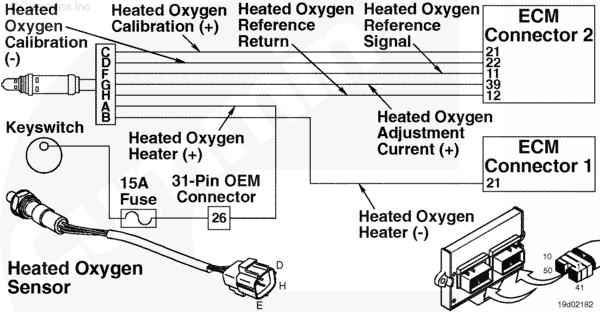 |
Circuit Description
The electronic control module (ECM) uses this sensor to determine the composition of the exhaust gas and then, to adjust fueling.
Component Location
The heated oxygen sensor is located in the exhaust outlet connection, after the turbocharger.
Shop Talk
The heated oxygen sensor measures the partial pressure of oxygen present in the exhaust gas. It measures this oxygen presence in lambda (L). The air/fuel ratio (stoichiometric) is 1L. The approximate lean-burn condition for the engine is 1.4.
This fault will light if there is not enough oxygen being pumped through the exhaust while motoring. Any presence of hydrocarbons can cause the heated oxygen sensor to misread the air oxygen content in the exhaust. Oil, fuel or air contaminants that can pass by the heated oxygen sensor can cause the sensor to misread and light the fault lamp. Keep in mind this will occur only in a motoring situation. The ECM uses data from motoring instances to recalibrate fuel tables and maintain optimum fuel operation for the engine.
Cautions and Warnings
 WARNING WARNING Do not touch the heated oxygen sensor until it has cooled. The heated oxygen sensor operates at high temperature and can cause personal injury.
|
 CAUTION CAUTION Do not use any lubricant in the heated oxygen sensor connector. The sensor will not perform correctly with any grease in the connector. |
Troubleshooting Steps
| STEPS | SPECIFICATIONS | |
|---|---|---|
| STEP 1. | Check the fault codes. | |
| STEP 1A. Check for multiple fault codes. | Fault Code 751 or 752 active? | |
| STEP 2. | Check the fuel control valve. | |
| STEP 2A. Check for a stuck open fuel control valve. | Secondary fuel pressure drop within 50 seconds of key on? | |
| STEP 3. | Check oil consumption. | |
| STEP 3A. Check for excessive oil consumption. | Excessive oil consumption? | |
| STEP 3B. Check the crankcase ventilation canister. | Crankcase ventilation canister plugged or restricted? | |
| STEP 4. | Check for air contaminants. | |
| STEP 4A. Check for alternate fuel source or air contaminants. | Alternate fuel source or air contaminants | |
| STEP 5. | Clear the fault codes. | |
| STEP 5A. Disable the fault codes. | Fault Code 2229 inactive? | |
| STEP 5B. Clear the inactive fault codes. | All fault codes cleared? | |
Guided Step 1 – Check the fault codes.
| Guided Step 1A – Read for multiple fault codes. | |
|---|---|
Conditions
Action
|
|
|
Fault Code 751 or 752 active? |
|
| YES | NO |
| No Repair | No Repair |
|
Fault Code 751 or Fault Code 752
|
|
Guided Step 2 – Check the fuel control valve.
| Guided Step 2A – Check for a stuck open fuel control valve. | |
|---|---|
Conditions
Action
Note: If the fuel control valve is stuck open, raw fuel will be dumped into the engine and out the exhaust. This will cause the heated oxygen sensor to read a lower than actual air oxygen value. |
|
|
Secondary fuel pressure drop within 50 seconds of keyswitch on? |
|
| YES | NO |
|
A defective fuel control valve has been detected. Replace the fuel control valve. Refer to Procedure 019-102. Use INSITE™ electronic service tool to reset the fuel tables. |
No Repair |
Guided Step 3 – Check oil consumption.
| Guided Step 3A – Check for excessive oil consumption. | |
|---|---|
Conditions
|
|
|
Excessive oil consumption? |
|
| YES | NO |
| No Repair | |
| Guided Step 3B – Check the crankcase ventilation canister. | |
|---|---|
Conditions
Action
If the filter becomes plugged or restricted, oil can be drawn through the turbocharger, engine and back through the exhaust side of the turbocharger. This can also cause excessive build up of hydrocarbons on the heated oxygen sensor. |
|
|
Crankcase ventilation canister plugged or restricted? |
|
| YES | NO |
|
Replace the crankcase ventilation canister filter. Refer to Procedure 003-021 in the in the C8.3G (Natural Gas) Engines, Troubleshooting and Repair Manual, Bulletin 3666206 or Procedure 003-021 in the B5.9G, B5.9LPG, B Gas Plus and B LPG Plus Troubleshooting and Repair Manual, Bulletin 3666164. |
No Repair |
Guided Step 4 – Check for air contaminants.
| Guided Step 4A – Check for alternate fuel source or air contaminants. | |
|---|---|
Conditions
Action
Note: Air contaminants over time can cause the oxygen sensor to misread oxygen content in the air. If this occurs, the fuel tables can become inaccurate and cause poor open loop performance. |
|
|
Alternate fuel source or air contaminant? |
|
| YES | NO |
|
Reset the fueling tables. Use INSITE™ electronic service tool to reset the fuel tables. Engine must not be operated in the presence of combustible vapors. |
No Repair |
Guided Step 5 – Clear the fault code.
| Guided Step 5A – Disable the fault code. | |
|---|---|
Conditions
Action
|
|
|
Fault Code 2229 inactive? |
|
| YES | NO |
| No Repair | No Repair |
| Guided Step 5B – Clear the inactive fault codes. | |
|---|---|
Conditions
Action
|
|
|
All fault codes cleared? |
|
| YES | NO |
| No Repair | No Repair |
|
Repair complete
|
Appropriate troubleshooting steps
|

;)
;)