|
Vehicle Speed Sensor Circuit – Input Signal Lost
|

Overview
| CODE | REASON | EFFECT |
| Fault Code: 241 PID: P84 SPN: 84 FMI: 2 LAMP: Amber SRT: |
Vehicle Speed Sensor Circuit – data erratic, intermittent, or incorrect. The ECM lost the vehicle speed signal. |
Engine speed limited to maximum engine speed without VSS parameter value. Cruise Control, gear-down protection, and road speed governor will not work. |
|
Vehicle Speed Sensor Circuit |
 |
Circuit Description
The vehicle speed sensor is an OEM-supplied sensor but can provide an input to the electronic control module (ECM) for added features such as road speed governing and cruise control.
Component Location
Refer to the OEM manual for location of this sensor. Usually, this sensor is installed in the tail shaft of the transmission.
Shop Talk
- Disconnect the vehicle speed sensor connector that connects to the OEM speedometer, or trip recorder, and move the vehicle. If the fault goes inactive, there is probably electrical noise being fed into the vehicle speed sensor circuit from the OEM device.
- Verify the vehicle speed sensor wires in the OEM harness are twisted pairs.
- This sensor usually has one coil but can have two. Only one is used.
- Vehicle speed can also be transmitted via the data link if the vehicle is utilizing the J1939. If no sensor is found but vehicle speed is being read, then it is likely being transmitted; so no vehicle speed sensor is used.
Cautions and Warnings
 CAUTION CAUTION To reduce the possibility of damaging a new ECM, all other active fault codes must be investigated prior to replacing the ECM. |
|
CAUTION To reduce the possibility of pin and harness damage, use the following test leads when taking a measurement: |
|
CAUTION To reduce the possibility of pin and harness damage, use the appropriate test lead when taking a |
Troubleshooting Steps
| STEPS | SPECIFICATIONS | |
|---|---|---|
| STEP 1. | Check the fault codes. | |
| STEP 1A. Read the fault codes. | Fault Code 241 active? | |
| STEP 2. | Check the vehicle speed sensor. | |
| STEP 2A. Inspect the OEM harness and sensor connector pins. | Dirty or damaged pins? | |
| STEP 2B. Read the fault codes. | Fault Code 241 active? | |
| STEP 2C. Check the vehicle speed sensor for proper adjustment. | 1/2 to 3/4 of a turn out from the gear? | |
| STEP 2D. Check the vehicle speed sensor resistance. | 750 to 1500 ohms? | |
| STEP 2E. Check the vehicle speed sensor for a short circuit to ground. | More than 100k ohms? | |
| STEP 2F. Check the vehicle speed sensor for a short circuit between coils. | More than 100k ohms? | |
| STEP 3. | Check the engine harness. | |
| STEP 3A. Inspect the engine harness and ECM connector pins. | Dirty or damaged pins? | |
| STEP 3B. Read the fault codes. | Fault Code 241 active? | |
| STEP 3C. Check for an open circuit. | Less than 10 ohms? | |
| STEP 3D. Check for a short circuit to ground. | More than 100k ohms? | |
| STEP 3E. Check for a short circuit from pin to pin. | More than 100k ohms? | |
| STEP 4. | Clear the fault codes. | |
| STEP 4A. Disable the fault code. | Fault Code 241 inactive? | |
| STEP 4B. Clear the inactive fault codes. | All fault codes cleared? | |
Guided Step 1 – Check the fault codes.
| Guided Step 1A – Read the fault codes. | |
|---|---|
Conditions
|
|
|
Fault Code 241 active? |
|
| YES | NO |
| No Repair | No Repair |
Guided Step 2 – Check the vehicle speed sensor.
| Guided Step 2A – Inspect the OEM harness and sensor connector pins. | |
|---|---|
Conditions
Action
|
|
|
Dirty or damaged pins? |
|
| YES | NO |
|
Repair or replace the OEM harness, or replace the sensor, whichever has the damaged pins.
|
No Repair |
| Guided Step 2B – Read the fault codes. | |
|---|---|
Conditions
Action
|
|
|
Fault Code 241 active? |
|
| YES | NO |
| No Repair | No Repair |
| Guided Step 2C – Check the vehicle speed sensor for proper adjustment. | |
|---|---|
Conditions
|
|
|
½ to ¾ of a turn out from the gear? |
|
| YES | NO |
| No Repair |
Adjust the sensor. Refer to Procedure 019-091. |
| Guided Step 2D – Check the vehicle speed sensor resistance. | ||
|---|---|---|
Conditions
Action
|
|
|
|
750 to 1500 ohms? |
||
| YES | NO | |
| No Repair | ||

| Guided Step 2E – Check the vehicle speed sensor for a short circuit to ground. | ||
|---|---|---|
Conditions
Action
|
|
|
|
More than 100k ohms? |
||
| YES | NO | |
| No Repair | ||
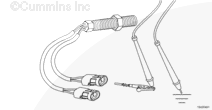
| Guided Step 2F – Check the vehicle speed sensor for a short circuit between coils. | ||
|---|---|---|
Conditions
Action
|
|
|
|
More than 100k ohms? |
||
| YES | NO | |
| No Repair | ||

Guided Step 3 – Check the engine harness.
| Guided Step 3A – Inspect the engine harness and ECM connector pins. | |
|---|---|
Conditions
Action
|
|
|
Dirty or damaged pins? |
|
| YES | NO |
|
Repair or replace the engine harness, or replace the ECM, whichever has the damaged pins.
|
No Repair |
| Guided Step 3B – Read the fault codes. | |
|---|---|
Conditions
Action
|
|
|
Fault Code 241 active? |
|
| YES | NO |
| No Repair | No Repair |
| Guided Step 3C – Check for an open circuit. | ||
|---|---|---|
Conditions
Action
|
|
|
|
Less than 10 ohms? |
||
| YES | NO | |
| No Repair |
Repair or replace the engine harness or OEM harness |
|
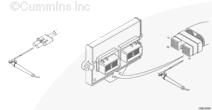
| Guided Step 3D – Check for a short circuit to ground. | ||
|---|---|---|
Conditions
Action
|
|
|
|
More than 100k ohms? |
||
| YES | NO | |
| No Repair |
Repair or replace the engine harness. |
|
|
3E
|
||
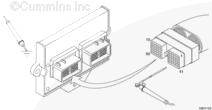
|
CAUTION To reduce the possibility of pin and harness damage, use the appropriate test lead when taking a |
| Guided Step 3E – Check for a short circuit from pin to pin. | ||
|---|---|---|
Conditions
Action
|
|
|
|
More than 100k ohms? |
||
| YES | NO | |
| No Repair |
Repair or replace the engine harness. |
|
|
4A
|
||
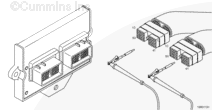
Guided Step 4 – Clear the fault codes.
| Guided Step 4A – Disable the fault code. | |
|---|---|
Conditions
Action
|
|
|
Fault Code 241 inactive? |
|
| YES | NO |
| No Repair |
Troubleshooting procedures need to be repeated from the beginning. A failure mode will possibly have been detected. |
| Guided Step 4B – Clear the inactive fault codes. | |
|---|---|
Conditions
Action
|
|
|
All fault codes cleared? |
|
| YES | NO |
| No Repair |
Troubleshoot any remaining active fault codes. |
|
Repair complete
|
Appropriate troubleshooting charts
|

;)
;)
;)
;)
;)
;)
;)
;)
;)
;)
;)
;)
;)
;)