|
Fuel Temperature Sensor Circuit – Shorted Low
|

Overview
| CODE | REASON | EFFECT |
| Fault Code: 265 PID: P174 SPN: 174 FMI: 4 LAMP: Amber SRT: |
Fuel Temperature Sensor Circuit – Shorted Low. Low voltage (short to ground) detected at the ECM. |
Possible reduced performance. |
|
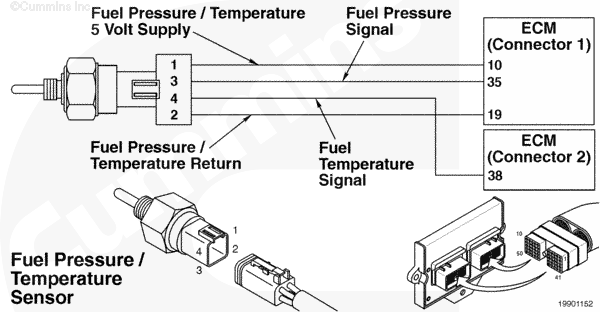
Fuel Temperature Sensor Circuit |
 |
Circuit Description
The electronic control module (ECM) uses the fuel pressure/temperature sensor (combination sensor) to measure the fuel temperature, as well as the secondary pressure.
Component Location
The fuel pressure/temperature sensor is located in the fuel housing.
Shop Talk
The fuel pressure/temperature sensor measures secondary fuel pressure and temperature at the mixer housing after the low-pressure regulator.
All temperature sensors:
- The resistance of the sensor varies with temperature. The reading observed must compare to the following table if the sensor is functioning properly.
| Temperature (°C) | Temperature [°F] | Resistance (ohms) |
| 0 | 32 | 30k to 36k |
| 25 | 77 | 9k to 11k |
| 50 | 122 | 3k to 4k |
| 75 | 167 | 1350 to 1500 |
| 100 | 212 | 600 to 675 |
Cautions and Warnings
 CAUTION CAUTION To reduce the possibility of damaging a new ECM, all other active fault codes must be investigated prior to replacing the ECM. |
|
CAUTION To reduce the possibility of pin and harness damage, use the following test leads when taking a measurement: |
Troubleshooting Steps
| STEPS | SPECIFICATIONS | |
|---|---|---|
| STEP 1. | Check the fault codes. | |
| STEP 1A. Check for multiple fault codes. | Fault Code 265 inactive? | |
| STEP 2. | Check the fuel temperature sensor and circuit. | |
| STEP 2A. Inspect the fuel temperature sensor and connector pins. | Dirty or damaged pins? | |
| STEP 2B. Check the circuit response. | Fault Code 263 active and Fault Code 265 inactive? | |
| STEP 2C. Check the fault codes and verify the sensor condition. | Fault Code 265 active? | |
| STEP 3. | Check the ECM and engine harness. | |
| STEP 3A. Inspect the ECM and engine harness connector pins. | Dirty or damaged pins? | |
| STEP 3B. Check for a pin to pin short circuit in the engine harness. | Greater than 100k ohms? | |
| STEP 3C. Check for a pin short circuit to ground. | Greater than 100k ohms? | |
| STEP 3D. Check for an inactive fault code. | Fault Code 265 inactive? | |
| STEP 4. | Clear the fault codes. | |
| STEP 4A. Disable the fault code. | Fault Code 265 inactive? | |
| STEP 4B. Clear the inactive fault codes. | All fault codes cleared? | |
Guided Step 1 – Check the fault codes.
| Guided Step 1A – Check for an inactive fault code. | |
|---|---|
Conditions
Action
|
|
|
Fault Codes 265 inactive? |
|
| YES | NO |
| No Repair | No Repair |
|
Procedure 019-362
|
|
Guided Step 2 – Check the fuel temperature sensor and circuit.
| Guided Step 2A – Inspect the fuel temperature sensor and connector pins. | |
|---|---|
Conditions
Action
For general inspection techniques, refer to Component Connector and Pin Inspection, Procedure 019-361. |
|
|
Dirty or damaged pins? |
|
| YES | NO |
|
Repair the damaged pins. Repair or replace the harness, whichever has the damaged pins. |
No Repair |
| Guided Step 2B – Check the circuit response. | |
|---|---|
Conditions
Action
|
|
|
Fault Code 263 active and Fault Code 265 inactive? |
|
| YES | NO |
| No Repair | No Repair |
| Guided Step 2C – Read the fault codes and verify sensor condition. | |
|---|---|
Conditions
Action
|
|
|
Fault Code 265 active? |
|
| YES | NO |
|
A defective sensor has been detected. Replace the fuel temperature sensor. Refer to Procedure 019-153. |
None. The removal and installation of the connector corrected the failure. |
Guided Step 3 – Check the ECM and engine harness.
| Guided Step 3A – Inspect the ECM and engine harness connector pins. | |
|---|---|
Conditions
Action
For general inspection techniques, refer to Component Connector and Pin Inspection, Procedure 019-361. |
|
|
Dirty or damaged pins? |
|
| YES | NO |
|
A defective connection has been detected in the ECM engine connector or engine harness connectors. Repair the damaged pins. Repair or replace the harness, whichever has the damaged pins. |
No Repair |
| Guided Step 3B – Check for a pin to pin short circuit in the engine harness. | |
|---|---|
Conditions
Action
Refer to the circuit diagram or wiring diagram for connector pin identification. For general resistance measurement techniques, refer to Resistance Measurements Using a Multimeter and Wiring Diagram, Procedure 019-360. |
|
|
Greater than 100k ohms? |
|
| YES | NO |
| No Repair |
A pin to pin short circuit on the signal line has been detected in the engine harness. Repair the damaged pins. Repair or replace the harness, whichever has the damaged pins. |
| Guided Step 3C – Check for a pin short circuit to ground. | |
|---|---|
Conditions
Action
Refer to the circuit diagram or wiring diagram for connector pin identification. For general resistance measurement techniques, refer to Resistance Measurements Using a Multimeter and Wiring Diagram, Procedure 019-360. |
|
|
Greater than 100k ohms? |
|
| YES | NO |
| No Repair |
A pin to ground short circuit on the signal line has been detected in the engine harness. Repair the damaged pins. Repair or replace the harness, whichever has the damaged pins. |
| Guided Step 3D – Check for an inactive fault code. | |
|---|---|
Conditions
Action
|
|
|
Fault Codes 265 inactive? |
|
| YES | NO |
|
None. The removal and installation of the connector corrected the failure. |
Replace the ECM. Call for pre-authorization. Refer to Procedure 019-031. |
Guided Step 4 – Clear the fault codes.
| Guided Step 4A – Disable the fault code. | |
|---|---|
Conditions
Action
|
|
|
Fault Code 265 inactive? |
|
| YES | NO |
| No Repair | No Repair |
| Guided Step 4B – Clear the inactive fault codes. | |
|---|---|
Conditions
Action
|
|
|
All fault codes cleared? |
|
| YES | NO |
| No Repair | No Repair |
|
Repair complete
|
Appropriate troubleshooting charts
|

;)
;)